




Introduction
In a previous post, I shared how to run OWASP ZAP as a DAST tool using GitHub Actions.
However, some challenges emerged in actual operation. DAST scans are typically run against non-production environments such as staging, but these environments often have IP restrictions enforced by security groups or AWS WAFs.
Since GitHub Actions uses a large and frequently changing pool of IP addresses, it is impractical to whitelist and manage them all.
To address this, I experimented with running OWASP ZAP on AWS CodeBuild.
Why CodeBuild?
I considered several options for the scan execution environment.
Keeping an EC2 instance always running was one possibility, but since scans are only performed periodically, doing so would be cost-inefficient and would add operational overhead such as patch management.
AWS Lambda was also considered, but its 15-minute execution limit makes it unsuitable for full scans of large web applications. ECS Fargate is another option, but managing task definitions and cluster settings is too complex for a relatively simple scanning task.
Ultimately, I chose AWS CodeBuild. It is serverless, requires no EC2 management, and its pay-per-use model makes it highly cost-effective.
Additional benefits include scalability for running multiple scans in parallel and easy integration with other AWS services like EventBridge and S3.
Architecture Overview
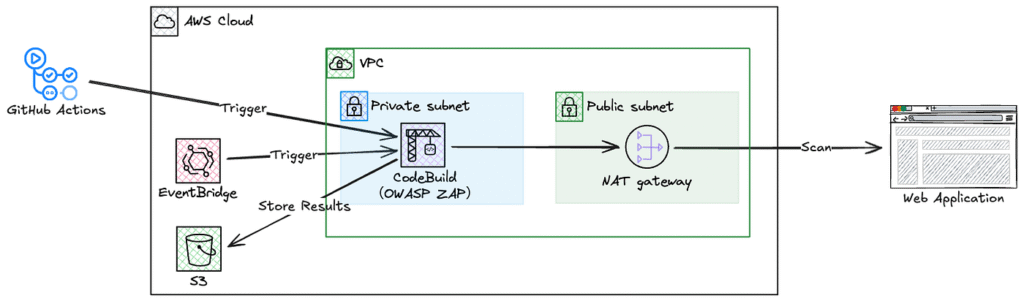
Here is the overall system architecture:
Environment
I used the same setup I had for previous SAST and DAST experiments:
- Programming language: Python
- CI/CD is handled via GitHub Actions
- Application and infrastructure are managed in a monorepo like this:
├── .github              # GitHub Actions workflow directory (e.g., build, test, deploy)
│   └── workflows
│       └── deploy.yml
├── app                  # Application source code directory (e.g., Python Flask app)
│   ├── __init__.py
│   ├── Dockerfile
│   ├── main.py
│   └── requirements.txt
└── terraform            # Infrastructure-as-Code configuration using Terraform
    ├── main.tf
    └── variables.tf
Once again, I used the following code which contains common vulnerabilities.
app/main.py:
import os

from flask import Flask, request

app = Flask(__name__)

# Hardcoded secret key (security issue)
app.config["SECRET_KEY"] = "hardcoded-secret-key"  # ⚠️ Hardcoded secret key

IMAGE_TAG = os.environ.get("IMAGE_TAG", "unknown")


@app.route("/")
def index():
    # Using eval on user input (Remote Code Execution risk)
    user_input = request.args.get("tag", "default")
    result = eval(f'"{IMAGE_TAG}-{user_input}"')  # ⚠️ Dangerous usage
    return f"IMAGE_TAG: {result}"


if __name__ == "__main__":
    # Starting with debug mode enabled (should not be used in production)
    port = int(os.environ.get("PORT", "5000"))
    app.run(host="0.0.0.0", port=port, debug=True)  # ⚠️ Debug mode on
Implementation Highlights
1. Network Design
CodeBuild runs in a private subnet and accesses the internet via a NAT Gateway. This allows the NAT Gateway’s Elastic IP to be used as the fixed source IP, which can be whitelisted in the security group or AWS WAF of the scan target environment.
2. GitHub Actions Integration
Based on the following documentation, I configured GitHub OIDC provider and IAM role in AWS to allow GitHub Actions to trigger CodeBuild.
Configuring OpenID Connect in Amazon Web Services – GitHub Docs
Use OpenID Connect within your workflows to authenticate with Amazon Web Services.
GitHub Actions workflow setup:
jobs:
  dast:
    runs-on: ubuntu-latest

    steps:
      - name: Configure AWS credentials
        uses: aws-actions/configure-aws-credentials@v4
        with:
          role-to-assume: ${{ secrets.DEMO_AWS_ROLE_ARN }}
          aws-region: ap-northeast-1

      - name: Start CodeBuild
        run: |
          aws codebuild start-build \
            --project-name owasp-zap-scan \
            --environment-variables-override \
              name=TARGET_URL,value=${{ github.event.inputs.target_url || secrets.DAST_TARGET_URL }} \
              name=APP_NAME,value=app-a
Specify the IAM role ARN in DEMO_AWS_ROLE_ARN and the scan target URL in DAST_TARGET_URL, both configured as GitHub Secrets.
3. EventBridge
To minimize management overhead when targeting multiple environments, I plan to use a single CodeBuild project.EventBridge rules are created per environment, passing TARGET_URL and APP_NAME as environment variables at build time.
4. CodeBuild Project
The CodeBuild project is configured to run within a VPC.
The subnet’s route table directs default traffic (0.0.0.0/0) to the NAT Gateway.
No inbound rules are needed for the security group. Only an outbound rule allowing all traffic is configured.
5. Buildspec
Here’s the buildspec configuration:
version: 0.2

phases:
  pre_build:
    commands:
      - echo Logging in to Docker Hub...
      - echo Starting OWASP ZAP security scan
      - echo Target URL is $TARGET_URL
      - echo App Name is $APP_NAME

  build:
    commands:
      - echo Build started on `date`
      - echo Running OWASP ZAP full scan
      - echo Target URL is $TARGET_URL
      - mkdir -p reports
      - chmod 777 reports
      - echo "Starting Docker container..."
      - |
        docker run --rm \
          -v $(pwd)/reports:/zap/wrk/:rw \  # Mount volume for report output
          -u $(id -u):$(id -g) \            # Run with current user ID
          ghcr.io/zaproxy/zaproxy:stable \  # OWASP ZAP official image
          zap-full-scan.py \                # Full scan script
          -t $TARGET_URL \                  # Target URL to scan
          -J zap-report.json \              # JSON format report
          -r zap-report.html \              # HTML format report
          || true                           # Continue even if error occurs
      - echo ZAP scan completed

  post_build:
    commands:
      - echo Build completed on `date`
      - echo Checking for report files
      - ls -la reports/
      - test -f reports/zap-report.json || echo '{}' > reports/zap-report.json
      - test -f reports/zap-report.html || echo '<html><body>No scan results</body></html>' > reports/zap-report.html
      - echo Report files created/verified
      - |
        # Create app-specific directory structure
        APP_NAME=${APP_NAME:-unknown}
        BUILD_UUID=$(echo $CODEBUILD_BUILD_ID | cut -d':' -f2)   # Extract unique identifier from build ID
        mkdir -p $APP_NAME/$BUILD_UUID                           # Create directory
        cp reports/zap-report.* $APP_NAME/$BUILD_UUID/           # Copy report files
        rm -rf reports                                           # Remove original reports directory
        ls -la $APP_NAME/$BUILD_UUID/

artifacts:
  files:
    - '*/*/*' # Send all files under APP_NAME/BUILD_UUID/ to S3
  name: scan-report
6. Artifacts
I wanted to store the scan results in S3 separately by environment, but it seems that CodeBuild’s Artifacts settings like Path and Namespace type can’t be overridden at build time.
Press enter or click to view image in full size
Artifacts settingsTo address this, I chose to dynamically create the directory structure in the post_build phase of the buildspec.
  post_build:
    commands:
      ...
      - |
        # Create app-specific directory structure
        APP_NAME=${APP_NAME:-unknown}
        BUILD_UUID=$(echo $CODEBUILD_BUILD_ID | cut -d':' -f2)   # Extract unique identifier from build ID
        mkdir -p $APP_NAME/$BUILD_UUID                           # Create directory
        cp reports/zap-report.* $APP_NAME/$BUILD_UUID/           # Copy report files
With the above configuration, the scan results are stored as follows:
S3 Bucket/
└── codebuild-project-name/
    ├── APP_NAME/
    │   ├── BUILD_UUID/
    │   │   ├── zap-report.html
    │   │   └── zap-report.json
    │   └── BUILD_UUID/
    │       ├── zap-report.html
    │       └── zap-report.json
    └── APP_NAME/
        ├── BUILD_UUID/
        │   ├── zap-report.html
        │   └── zap-report.json
        └── BUILD_UUID/
            ├── zap-report.html
            └── zap-report.json
7. Example Scan Results
I triggered CodeBuild from both GitHub Actions and EventBridge, and both builds completed successfully.
For reference, Build number 10 was triggered via EventBridge, while Build number 11 was triggered via GitHub Actions.
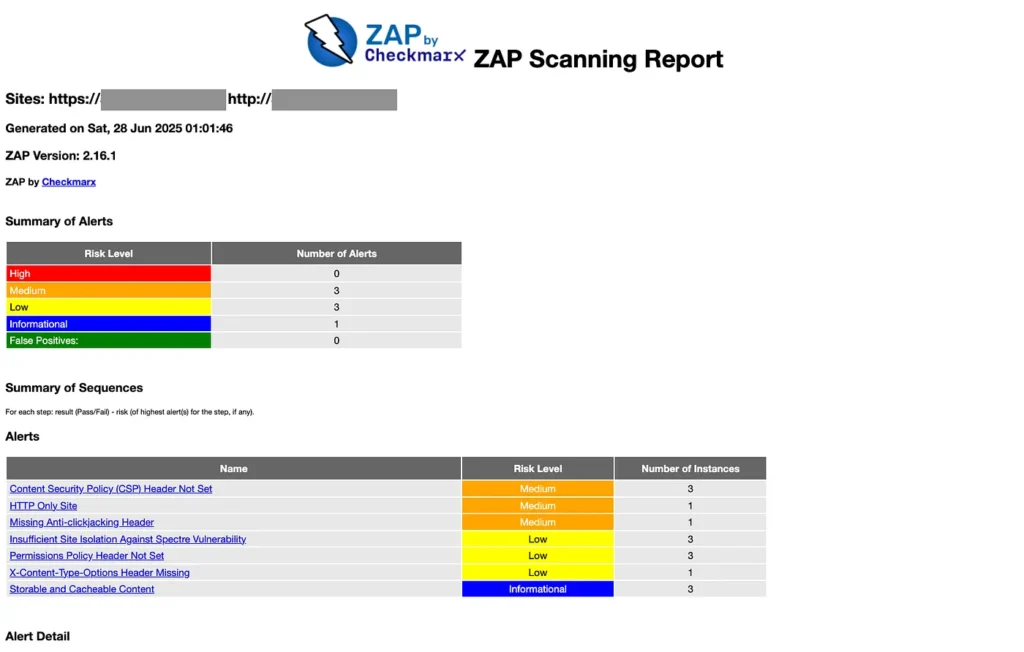
The scan reports were properly output to S3.
For reference, the HTML version of the report looked like this.
Conclusion
The basic functionality was verified, but the following improvements are needed for production use:
- Enhanced GitHub Actions Integration: Display scan summaries and fetch results directly within GitHub Actions
- Alerting: Auto-notification for high or critical vulnerabilities (e.g., email or Slack)
- Adopt a Management Tool: Introduce a tool to centrally manage vulnerabilities detected across multiple environments where DAST was run.
Implementing these features will create a more practical security scanning system.
Thank you for reading this far!