




Containers as a Service (CaaS) like AWS Fargate have proven to be a valuable mechanism for DevOps teams to build and deploy complex applications at scale. By removing the need for infrastructure management and security, customers can also reduce development costs using AWS Fargate. However, based on the shared responsibility model, customers are still responsible for the security of their applications and have to ensure that the code and workloads that run on their containers are secure. This blog post will explore the benefits of AWS Fargate, the security challenges it presents, and how the Xantra Security Services can protect AWS Fargate containers through their lifecycle.
What Is AWS Fargate?
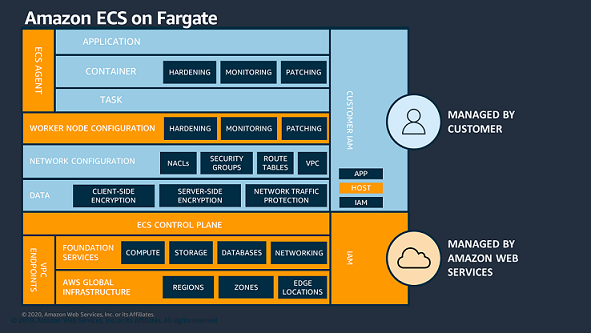
AWS Fargate is a way to deploy containers on Elastic Kubernetes Service (EKS) and Elastic Container Service (ECS), the two managed container services in the AWS cloud. Fargate automates most of the work required to set up and manage the host infrastructure, letting you run containers without provisioning or managing servers. It’s a fully managed service, meaning all the configuration is done for you. It is a cost-effective way to run containers making it easy for organizations to use them in the cloud at scale and maintain high availability across their applications. AWS calls Fargate a “serverless compute engine”; it eliminates the need to manage servers when deploying containers in the AWS cloud.
What Does AWS Fargate Do?
Fargate solves the challenge of managing infrastructure to host containers for many teams. Modern container tooling solves most of the pain points associated with deploying and managing containerized applications. The one thing that standard container platforms don’t do is set up the host infrastructure for you or scale that infrastructure up and down as your load fluctuates. Fargate allows you to deploy containers without worrying about the underlying infrastructure. You simply load your container images into either EKS or ECS, and Fargate runs them. AWS Fargate is an effective way to minimize the effort required to run containers in the Amazon cloud. But the significant trade-off is control over your host infrastructure and your security.
Embedding Security in the DevOps Process
Gartner predicts that by 2022 more than 75% of global organizations will be running containerized applications in production. AWS Fargate simplifies the deployment and compute/storage management of the containers. This provides a significant advantage: you can run containers without managing servers or clusters of Amazon EC2 instances and focus on designing and building your applications. This typically means essential infrastructure maintenance activities like scaling and installing patches are taken care of. However, the networking and security of containers are solely for customers to manage. Developers are still ultimately responsible for the secure execution of their code including application logic, code, and data. CaaS platforms like AWS Fargate are simply there to manage the container environment. AWS does provide some networking and security functionalities, but in today’s complex runtime world, security challenges remain for the serverless app developer.
Integrate and Automate Fargate Container Security and Block Attacks
A containerized environment must be secured across the entire lifecycle – from dev to cloud and back. A solid security strategy helps prevent malicious activities and starts with implementing policies and safeguards to integrate and automate policies and processes while clocking unauthorized activities. Container security is complex in that compared to traditional security it needs to be secured across the development lifecycle, from securing the build pipeline and container images to container runtimes and application layers. Additionally, container security should be fully automated and embedded into all stages of the Software Development Life Cycle (SDLC) as part of the continuous delivery lifecycle used to build and release containerized applications. Xantra helps protect your Fargate containers using some key features like:
Automate DevSecOps
- Improve Supply Chain Security by shifting-left early into the DevOps pipeline and integrating with your Source Code Management (SCM) or Continuous Integration/Continuous Delivery (CI/CD) tools or Image Registries to scan and detect issues such as
- Vulnerabilities
- Malware
- Misconfigurations
- Sensitive Data
- Malicious Behavior – using Dynamic Threat Analysis
Automate Policies and Process
- Implement custom assurance policies/security gates that prevent non-compliant images from being built.
- Use a Dynamic Thread Analysis sandbox to perform runtime behavioral analysis of built images before being pushed to registry or production.
- Implement custom runtime policies that
- Prevent non-compliant and unregistered (rogue) images from getting deployed. Allow network nano-segmentation for compliance and to minimize blast radius. Use Drift Prevention to ensure container immutability and block any unauthorized activities and zero-day attacks without stopping all container processes.
- Ensure real-time visibility and protection for audit and enforcement vs. API-based approaches.
Automate Regulatory Compliance
- Provide file integrity monitoring with a complete audit trail of any changes made.
- Out-of-the-box policies for PCI-DSS, HIPAA, EU GDPR, and the NIST framework. Built-in industry standard benchmarking reports like CIS. Provide advanced forensics for containers to help with incident response.
- Maintain history of scan results, policy changes, remediation actions, secrets rotation, runtime events, and user logins.
Setting up GuardDuty from the AWS Console
For ECS using a Fargate capacity provider, GuardDuty deploys the security agent as a sidecar container alongside the essential task container. This doesn’t require you to make changes to the deployment of your Fargate tasks and verifies that new tasks will have GuardDuty Runtime Monitoring. If the GuardDuty security agent sidecar container is unable to launch in a healthy state, the ECS Fargate task will not be prevented from running.
When using GuardDuty ECS Runtime Monitoring for Fargate, you can install the agent on Amazon ECS Fargate clusters within an AWS account or only on selected clusters. In the following sections, we show you how to enable the service and provision the agents.
Prerequisites
If you haven’t activated GuardDuty, follow the steps in Getting started with GuardDuty to set up the service and start monitoring your account. Alternatively, you can activate GuardDuty by using the AWS CLI. The AWS Identity and Access Management (IAM) role used for running an Amazon ECS task must be provided with access to Amazon ECR with the appropriate permissions to download the GuardDuty sidecar container. To learn more about Amazon ECR repositories that host the GuardDuty agent for AWS Fargate, see Repository for GuardDuty agent on AWS Fargate (Amazon ECS only).
Enable Fargate Runtime Monitoring
To enable GuardDuty Runtime Monitoring for ECS Fargate, follow these steps:
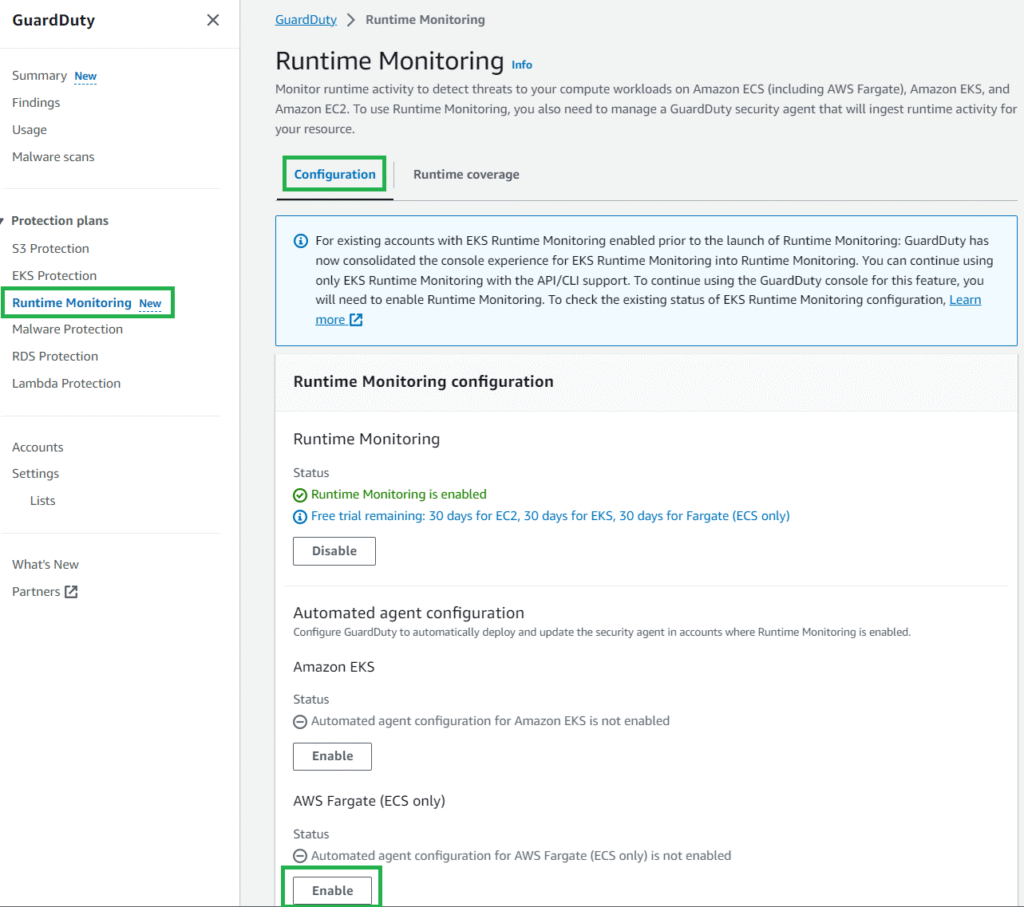
- In the GuardDuty console, in the navigation pane under Protection plans, select Runtime Monitoring.
- Select the Configuration tab and then in the AWS Fargate (ECS only) section, choose Enable.
Monitor selected ECS Fargate clusters
In most cases at Xantra Tech, We usually monitor selected ECS Fargate clusters when you want GuardDuty to handle the deployment and updates of the security agent exclusively for specific ECS Fargate clusters within your account. This could be a use case where you want to evaluate GuardDuty ECS Runtime Monitoring for Fargate. By using inclusion tags, GuardDuty automatically deploys and manages the security agent only for the ECS Fargate clusters that are tagged with the key-value pair GuardDutyManaged:true. To use inclusion tags, verify that the automated agent configuration for AWS Fargate (ECS) hasn’t been enabled.
To add an inclusion tag to an ECS cluster:
- In the Amazon ECS console, in the navigation pane under Clusters, select the cluster name.
- Select the Tags tab.
- Select Manage Tags and enter the key GuardDutyManaged and value true, then choose Save.
To make sure that these tags aren’t modified, you can prevent tags from being modified except by authorized principals.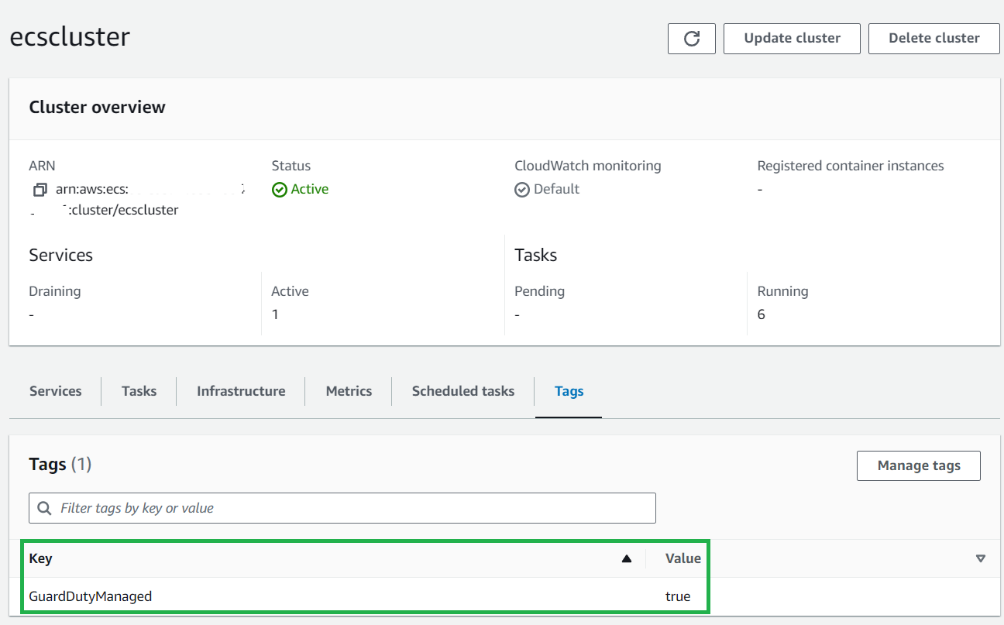
Fargate task level rollout
After you’re enabled GuardDuty ECS Runtime Monitoring for Fargate, newly launched tasks will include the GuardDuty agent sidecar container. For pre-existing long running tasks, you might want to consider a targeted deployment for task refresh to activate the GuardDuty sidecar security container. This can be achieved using either a rolling update (ECS deployment type) or a blue/green deployment with AWS CodeDeploy.
To verify the GuardDuty agent is running for a task, you can check for an additional container prefixed with aws-guardduty-agent-. Successful deployment will change the container’s status to Running.
To view the GuardDuty agent container running as part of your ECS task:
-
- In the Amazon ECS console, in the navigation pane under Clusters, select the cluster name.
- Select the Tasks tab.
- Select the Task GUID you want to review.
- Under the Containers section, you can view the GuardDuty agent container.
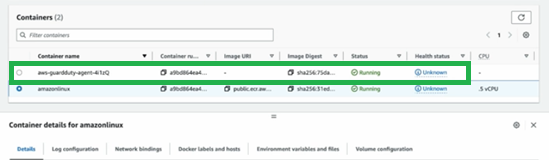
Figure 10: View status of the GuardDuty sidecar container
GuardDuty ECS on Fargate coverage monitoring
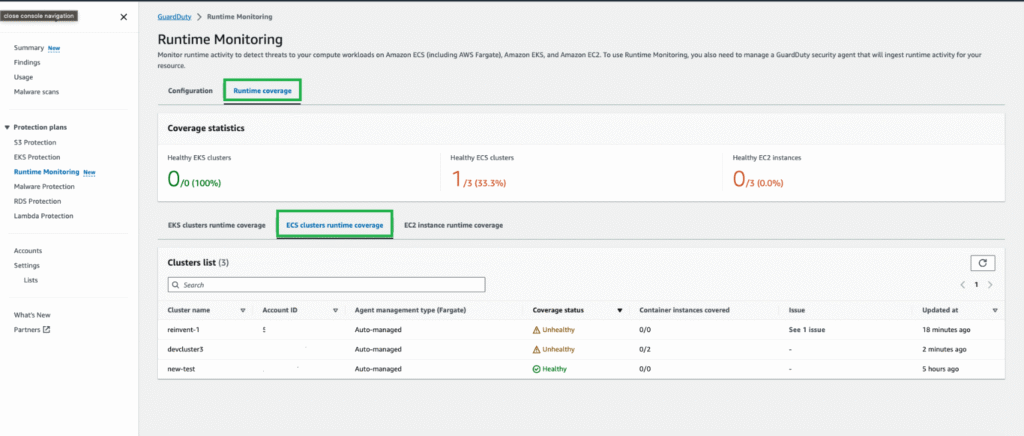
Coverage status of your ECS Fargate clusters is evaluated regularly and can be classified as either healthy or unhealthy. An unhealthy cluster signals a configuration issue, and you can find more details in the GuardDuty Runtime Monitoring notifications section. When you enable GuardDuty ECS Runtime Monitoring and deploy the security agent in your clusters, you can view the coverage status of new ECS Fargate clusters and tasks in the GuardDuty console.
To view coverage status:
- In the GuardDuty console, in the navigation pane under Protection plans, select Runtime Monitoring.
- Select the Runtime coverage tab, and then select ECS clusters runtime coverage.
Conclusion
We showed how easy is to setup guardduty from the AWS console, at Xantra we go further on automating the whole process via automation directly tied to your pipelines and software development cycle.